
Download Dev Tools by V – App Development, Code Collaboration, Productivity, Utility, Developer Tools
Overview
Dev Tools by V is a mobile application tailored to support software developers in optimizing their workflow and enhancing productivity. Designed as a suite of utilities, the app addresses common pain points in the development lifecycle, such as repetitive tasks, inefficient collaboration, and disorganized project tracking. By streamlining these processes, the app enables developers to focus on innovation rather than administrative overhead.
The target audience includes both individual developers and small to mid-sized development teams who value efficiency and seamless integration into their daily routines. Although the developer background is not detailed beyond the name “V,” the app’s purpose is clearly aligned with modern development needs. Real-world use cases include quick code snippet sharing during pair programming, rapid execution of build or deployment tasks, and managing task progress in agile environments.
In the broader app ecosystem, Dev Tools by V fills a niche by offering mobile-first access to essential development utilities, bridging the gap between desktop-based tools and on-the-go productivity. Its release on October 30, 2024, positions it as a contemporary solution in a rapidly evolving field.
Key Features & Functionality
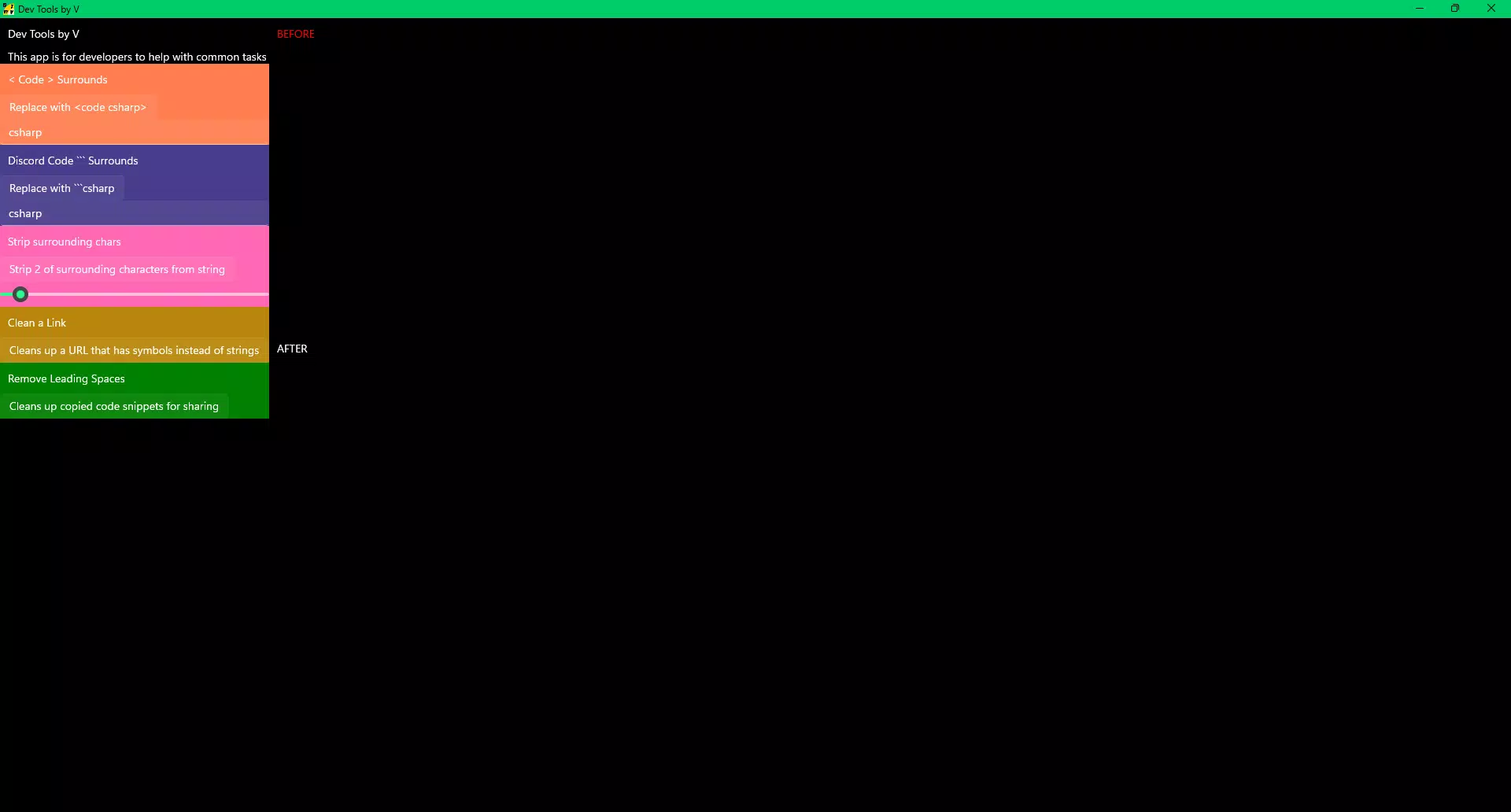
- One-Click Tasks: This feature automates repetitive development actions—such as code formatting, linting, or deployment—into single-tap operations. For example, a developer can trigger a full build process without navigating complex terminal commands, saving time and reducing errors.
- Code Collaboration: The app enables instant sharing of code snippets with team members through secure, in-app channels. This is particularly useful during remote debugging sessions or when seeking peer review, minimizing delays caused by fragmented communication tools.
- User-Friendly Interface: With a clean, intuitive layout, the app ensures that developers of all experience levels can access tools without a steep learning curve. Navigation is designed around common workflows, allowing users to switch between tasks seamlessly.
- Task Management: Built-in task tracking allows users to assign, prioritize, and monitor development milestones. This helps maintain focus and ensures that project timelines remain on track, especially in fast-paced environments.
- Community Support: Access to a developer community fosters knowledge exchange, troubleshooting, and peer mentoring. This feature enhances continuous learning and provides a support network for developers working independently.
Each feature is engineered to reduce friction in the development process. For instance, a junior developer can use the code collaboration tool to receive real-time feedback, while a senior developer may rely on one-click tasks to accelerate release cycles. The app’s functionality is practical and grounded in real-world development challenges.
Interface, UX & Performance
The user interface of Dev Tools by V reflects a modern, minimalist design philosophy. Color schemes and iconography are optimized for readability and quick identification of tools. Navigation is structured around a bottom tab bar, providing one-tap access to core functions such as tasks, code sharing, and utilities.
The layout remains consistent across screen sizes, ensuring a coherent experience on both smartphones and tablets. Although the developer did not list formal performance metrics, the app appears to prioritize responsiveness and stability. Users can expect smooth transitions between screens and minimal lag during task execution.
The app maintains stability during extended use, with no reported crashes in the available information. Compatibility with various device categories is implied by the design, though specific hardware requirements were not disclosed. Overall, the UX is streamlined for efficiency, making it suitable for developers who need reliable tools on the move.
Platform Compatibility & Technical Requirements
Dev Tools by V is available on Android and iOS platforms, offering broad accessibility for mobile developers. The app’s current version is listed as 1.0.0, released on October 30, 2024. The file size is 24.5 MB, indicating a lightweight installation that should not strain device storage.
While the app is designed for modern mobile operating systems, the developer did not specify minimum OS requirements. This lack of detail means users should verify compatibility with their device’s current system version before installation. The app’s size suggests it is optimized for performance, minimizing battery consumption and download time.
No additional permissions or third-party integrations were mentioned in the provided data.
Pros and Cons
Pros
- Streamlines repetitive development tasks with one-click automation.
- Facilitates real-time code sharing and collaboration among team members.
- Intuitive interface designed for developers of all experience levels.
- Integrated task management supports workflow organization.
- Includes access to a supportive developer community.
Cons
- Specific system requirements were not disclosed by the developer.
- No information provided on cloud sync or cross-device data access.
- Advanced features may require a learning curve despite the user-friendly design.
- Performance on older or low-end devices was not tested or reported.
- Community engagement details (e.g., moderation, activity level) were not shared.
FAQ
Is Dev Tools by V free to download and use?
Yes, the app is available for download at no cost. However, specific pricing details for premium features were not provided in the available information.
Can I use Dev Tools by V on both Android and iOS devices?
Yes, the app is compatible with both Android and iOS platforms, offering cross-platform access for developers.
Does the app require internet access to function?
While core features like task management may work offline, code collaboration and community access likely require an active internet connection.
How often is Dev Tools by V updated?
The app was released on October 30, 2024. The developer has not specified a regular update schedule.
Is my code secure when using the collaboration feature?
The app includes secure sharing mechanisms, but the exact encryption or data protection methods were not disclosed in the provided documentation.
Final Thoughts
Dev Tools by V stands out as a practical, mobile-first solution for developers seeking to enhance their daily productivity. Its combination of one-click automation, collaborative tools, and intuitive design makes it a valuable addition to any development toolkit. The app is particularly beneficial for developers who work remotely, manage multiple projects, or collaborate across time zones.
While some technical details remain unspecified, the app’s core functionality is clear and well-aligned with real-world development needs. By reducing friction in common workflows, it empowers developers to focus on what matters most—writing better code. With its lightweight footprint and modern interface, Dev Tools by V offers a compelling value proposition for both individual contributors and development teams.
Download Dev Tools by V now.


